


Mobile CCTV is a deployable video surveillance system designed to move with your needs—think trailers, rapid‑mount IP cameras, or vehicle‑based kits that stream to an NVR or the cloud. It delivers 24/7 coverage with cellular or Wi‑Fi backhaul and power options like batteries and solar, making it ideal for temporary sites in the local area.
By Aayush Patel, CEO, Alpha9 Solutions • Last updated: 2026-05-28
Above-Fold: Hook + Table of Contents
Use mobile CCTV when you need fast, flexible security without permanent wiring. It rolls out in hours, connects over 4G/5G or Wi‑Fi, records on an NVR, and streams to your phone. Below is a practical roadmap with steps, choices, and pitfalls to help you deploy confidently.
At Alpha9 Solutions, we combine certified electrical expertise with a curated shop of modern IP surveillance gear. This guide shows how mobile CCTV compares to fixed systems, how it works end to end, and how to choose cameras, NVRs, power, and mounts that fit your site.
- Overview at a Glance
- What Is Mobile CCTV?
- Why Mobile CCTV Matters
- How Mobile CCTV Works
- Types, Methods, and Approaches
- Best Practices
- Tools and Resources
- Case Studies and Examples
- Frequently Asked Questions
- Conclusion + Next Steps
- Related Articles
Overview at a Glance
Mobile CCTV provides rapid, relocatable surveillance using IP cameras, a recorder, and cellular or Wi‑Fi connectivity. It’s built for events, construction, pop‑up retail, and contingency coverage. Expect 4K options, Color Night Vision, smart motion alerts, and app-based remote viewing from day one.
Here’s the short version before we dive deep.
- What it is: Portable IP camera systems on trailers, masts, vehicles, or quick mounts.
- How it connects: 4G/5G, Wi‑Fi, or temporary Ethernet to an NVR; remote viewing via mobile app.
- Video quality: 4K (3840×2160 ≈ 8.3MP) captures more detail than 1080p; 30 FPS equals one frame every ~33 ms.
- Power options: AC, batteries, generators, or solar; many sites target 24–72 hours autonomy.
- Setups: Bullet, dome, and turret cameras with Color Night Vision and smart detection features.
- Recording: NVR channels commonly come in 8, 16, and 32; retention targets often span 30–90 days.
Local considerations for your area
- Plan for weather swings. Portable towers and outdoor junction boxes should be rated for rain and wind; use proper wire concealment to protect runs in the local area.
- Holiday foot traffic surges. Increase frame rate to 30 FPS and enable smart motion detection to reduce false alerts during busy periods.
- Cell coverage varies. Test 4G/5G signal where you deploy; a directional antenna can stabilize uplinks for remote viewing.
What Is Mobile CCTV?
Mobile CCTV is relocatable video surveillance built on IP cameras, a local recorder, and wireless backhaul. It’s designed to deploy fast, operate off-grid if needed, and stream to a phone or laptop for live views and playback. Think temporary sites, events, and evolving risk areas.
In practice, a mobile CCTV kit combines professional-grade IP cameras, a compact NVR, and a resilient power/communications stack. Systems can be mast-mounted, vehicle-based, or magnetically attached inside a facility. They support features like Color Night Vision, smart motion detection, listen‑in audio, and remote viewing.
Our shop curates 4K wired options, dual‑lens and ePoE models, and accessories such as outdoor junction boxes. Extended PoE solutions can push camera runs well beyond the typical 100 meters of standard PoE, supporting large sites without extra conversion gear.
Because mobile CCTV is portable, it’s ideal for project phases. Construction moves from lot clearing to framing to fit‑out; the mast or quick‑mounts move with it. Events add a new stage or gate? Reposition a turret or bullet camera in minutes and keep your angles tight.
For deeper context on the camera landscape, see our internal breakdowns like this CCTV systems explained guide and our broader vision CCTV overview that maps where IP solutions fit across properties.
Why Mobile CCTV Matters
It reduces blind spots when conditions change. Mobile CCTV follows the work, protects assets in transition, and adapts during crowd surges. You gain timely coverage, better evidence, and fewer gaps than fixed-only layouts can deliver on dynamic sites.
Three things make it valuable.
- Coverage where risk moves: A stage, tool crib, or entry gate might be secure on Monday and exposed by Friday. A portable tower lets you re‑aim in minutes.
- Evidence quality: 4K sensors capture facial and vehicle details better than 1080p, while 30 FPS smooths motion for incident review.
- Operational uptime: Solar/battery hybrids keep recording through power hiccups. Many towers target 1–3 days autonomy between charges.
On crowd-heavy days, smart motion detection reduces nuisance alerts by filtering people and vehicles from general movement. Paired with Color Night Vision, you’ll preserve detail after dark without relying solely on IR, which can wash out reflective clothing or signage.
We often pair mobile CCTV with fixed IP cameras: fixed for permanent chokepoints, mobile for hotspots. That layered approach aligns with our remote CCTV guide, where rapid situational awareness is the goal, not just recording.
How Mobile CCTV Works
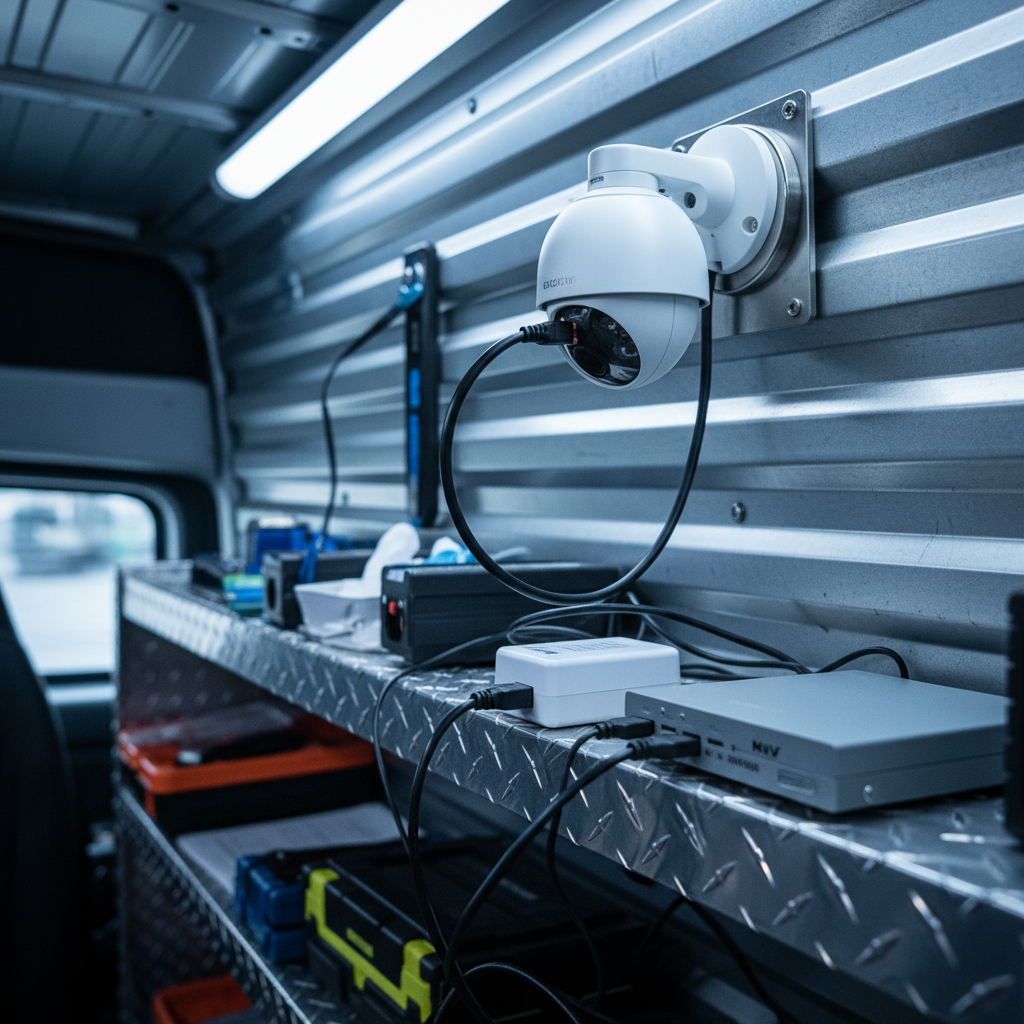
A mobile CCTV stack includes cameras, an NVR, connectivity, and power. Cameras stream IP video to the recorder; the recorder serves the mobile app. Connectivity rides on 4G/5G, Wi‑Fi, or temporary Ethernet. Power comes from AC, batteries, or solar—often in hybrid combinations.
Think in four layers that must cooperate:
1) Cameras and optics
- Resolution: 4K (≈8.3MP) captures plate and face detail across wider scenes than 1080p.
- Lens control: A motorized varifocal lens lets you fine‑tune field of view remotely without ladders.
- Form factors: Bullet for distance and deterrence, dome for discreet vandal resistance, turret for clean night images with less IR reflection.
- Low light: Color Night Vision retains color details in ambient light that standard IR would render monochrome.
2) Recording and retention
- NVR capacity: Common 8/16/32‑channel models; select based on number of streams and desired days of storage.
- Bitrate planning: A single 4K stream can range from ~4–12 Mbps depending on scene complexity and codec settings.
- Redundancy: Dual‑drive NVRs and hot‑spare SD cards in select cameras protect against single‑device failure.
3) Connectivity
- Cellular uplink: 4G/5G routers bond or failover SIMs; antenna choice impacts stability as much as signal strength.
- Wi‑Fi bridges: Short‑term links can span buildings; prioritize clear line‑of‑sight to cut retransmissions.
- Remote viewing: Use vendor apps to see live and recorded video; aim for push alerts tied to smart detection zones.
4) Power
- PoE runs: Standard PoE often supports ~100 m; extended PoE technologies push well beyond for large sites.
- Hybrid power: AC plus battery or solar extends autonomy; size arrays to support overnight draws and cloudy days.
- Junctions and protection: Weather‑rated outdoor junction boxes and neat wire concealment prevent moisture ingress and tampering.
When all four layers align, you get reliable streams and usable evidence, not just “cameras that turn on.” For recorder selection tradeoffs, our CCTV video recorder guide details channel counts, codecs, and retention math.
Types, Methods, and Approaches
Mobile CCTV spans trailers, portable towers, quick mounts, and vehicle kits. Choose by how fast you must deploy, how long you must run, and what angles you need. Mix bullet, dome, and turret cameras; add dual‑lens or panoramic units to reduce camera counts.
Portable towers and trailers
- Use case: Construction sites, parking overflow, festivals.
- Heights: Many masts extend ~20–30 ft, lifting optics above glare and vehicles.
- Power: Solar arrays paired with batteries target multi‑day autonomy; generators cover long overcast spells.
Rapid indoor/outdoor quick mounts
- Use case: Pop‑up retail, campus renovations, temporary lobbies.
- Hardware: Magnetic plates or clamp mounts; run PoE from a compact switch to the NVR.
- Optics: Turret cameras minimize IR bounce for cleaner night detail near glass or glossy finishes.
Vehicle or cart‑based kits
- Use case: Facility patrols, crowd control corridors, event logistics.
- Connectivity: In‑vehicle 4G/5G routers with GPS; prioritize antennas with proper ground planes.
- Recording: Ruggedized NVRs or SD redundancy for shocks and vibration.
Optical formats
- Bullet camera: Long‑range views and deterrent posture.
- Dome camera: Vandal‑resistant, discreet angles.
- Turret camera: Clean night imagery with fewer IR reflections.
- Dual‑lens/panoramic: Wider coverage with fewer mounts; great over queues and lots.
Where wide coverage is critical, pairing a panoramic view camera with a varifocal bullet on the same mast captures both context and detail. That combination reduces camera counts and cable runs without sacrificing identification shots.
Best Practices
Plan for angles, power, and bandwidth before you roll out. Map scenes, size storage for retention, and test cellular or Wi‑Fi uplinks. Secure hardware with weather‑rated boxes and neat wire concealment. Validate video quality at night, not just midday.
Design and placement
- Draw a simple map with threat lines, entry/exit paths, and must‑see zones (license plates, cash points, tool cribs).
- Place cameras to cross‑cover chokepoints; match lenses to distances using motorized varifocal control where possible.
- Target 30 FPS in high‑motion areas; drop to 15–20 FPS for static scenes to save storage.
Power and protection
- Use outdoor junction boxes rated for your environment; keep drip loops and gasketed seals tight.
- Right‑size batteries and solar, aiming for at least one full night of autonomy with a weather margin.
- Label and secure cabling; tidy wire concealment reduces accidental disconnects and tampering.
Connectivity and alerts
- Test 4G/5G at the exact deployment spot; a 10–15 ft antenna reposition can change reliability.
- Use smart motion detection zones to cut false alerts around trees, flags, and busy roads.
- Enable push notifications tied to people/vehicle events and review weekly to tune sensitivity.
Night and evidence quality
- Validate Color Night Vision scenes after sunset; add security lighting where ambient light is low.
- Lock in bitrate and shutter settings to avoid blur on fast movement like vehicles or running subjects.
- Document plate distances (e.g., 40–60 ft) per camera so staff know which view to pull for identification.
If you’re new to layout planning, our broader video surveillance guide shows how to translate risk into angles, fields of view, and retention targets that hold up under review.
Tools and Resources
Choose proven IP cameras, NVRs, and mounts. Favor 4K sensors, Color Night Vision, and smart motion analytics for evidence that holds up. Use extended PoE for longer runs, and keep a field kit with spare PoE injectors, patch cords, and weather gaskets.
From our hybrid electrical and security catalog, common building blocks for mobile CCTV include:
- 4K wired IP cameras: Crisp detail for plates and faces; pair with 30 FPS in high‑motion zones.
- Smart motion detection: People/vehicle filtering reduces alert fatigue and saves review time.
- Listen‑in audio (where permitted): Captures context during incidents; confirm policy and signage.
- Motorized varifocal lens: Remote zoom and focus; safer adjustments from the ground.
- ePoE/extended PoE: Longer cable runs that simplify large or spread‑out sites.
- Outdoor junction boxes: Clean, protected terminations and cable slack management.
For a hands‑on look at a turret with smart detection and audio, explore this product example in our storefront: 2K turret with smart motion. Features like these scale nicely into mobile CCTV kits.
Need a second opinion? Our electricians and low‑voltage techs can sanity‑check your layout and power plan. We pair service experience with a focused product lineup to keep your rollout smooth.
Case Studies and Examples
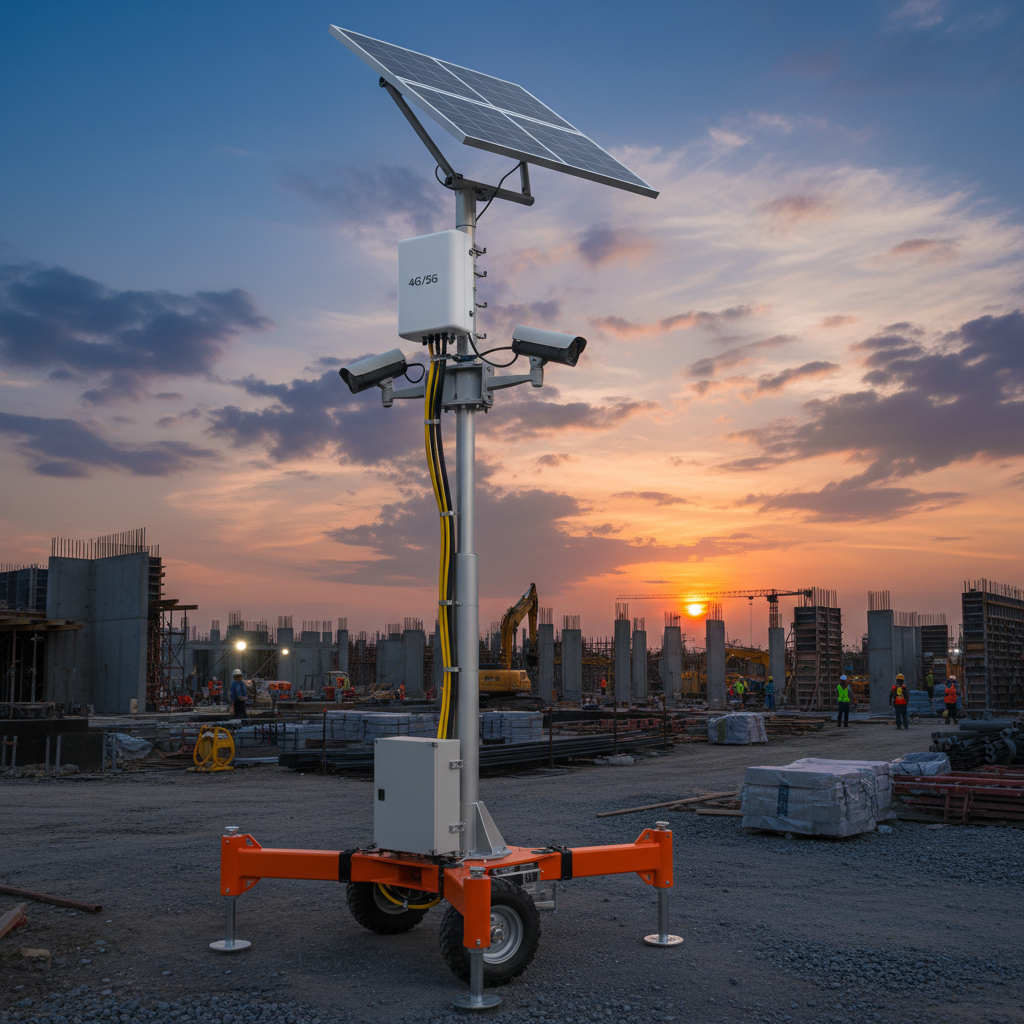
Mobile CCTV shines where risk shifts fast. On construction, at events, and during renovations, portable towers and quick‑mount kits deliver angles you’d otherwise miss. These brief examples map decisions to outcomes you can replicate.
Construction phase coverage
- Challenge: Tools and materials moved daily; fixed cameras missed the new laydown yard.
- Action: A solar tower with two 4K bullets and one turret covered the gate and yard.
- Result: Smart motion alerts flagged after‑hours movement; plate capture at ~50 ft provided actionable evidence.
Pop‑up retail perimeter
- Challenge: Weekend-only storefront needed coverage without permanent wiring.
- Action: Rapid magnetic mounts with PoE injectors fed a compact NVR; a panoramic view camera watched the queue.
- Result: Staff received person‑detected alerts and reviewed incidents from a mobile app during rush hours.
Campus lobby renovation
- Challenge: A temporary lobby rerouted foot traffic, creating blind corners.
- Action: A dome and turret pair covered the bend; listen‑in audio added context for after‑hours incidents.
- Result: Reduced false alarms with people detection; clean night footage thanks to Color Night Vision and added lighting.
For more decision frameworks that apply here, our CCTV surveillance primer explains how to translate policy into camera placement and alerting rules you can train on.
Mobile CCTV vs. Fixed IP Systems
Fixed IP cameras anchor long‑term chokepoints; mobile CCTV covers shifting risks. The best outcomes come from layering both: fixed for permanence, mobile for flexibility. The table below summarizes where each wins.
| Factor | Mobile CCTV | Fixed IP System |
|---|---|---|
| Deployment speed | Hours; minimal wiring | Days/weeks; permits and cabling |
| Coverage flexibility | High; reposition as needed | Low; re‑aim limited by mounts |
| Power options | AC, battery, solar, generator | Mainly AC/PoE |
| Backhaul | 4G/5G, Wi‑Fi, Ethernet | Primarily Ethernet |
| Best use | Events, construction, overflow lots | Entrances, docks, permanent chokepoints |
| Night detail | Color Night Vision + added lighting | Color Night Vision + fixed lighting |
Both approaches thrive on sound NVR planning. For recorder selection and retention sizing, revisit our NVR guide for pros and tradeoffs across channel counts and codecs.
Deployment Process (Step-by-Step)
Successful rollouts follow a simple order: map risks, pick angles, confirm power and backhaul, validate night scenes, then tune alerts. Document who reviews notifications and how long you’ll retain video. Train staff and rehearse incident retrieval.
- Define scenarios: Theft, trespass, safety monitoring, or crowd control. Rank by likelihood and impact.
- Sketch the site: Mark entries, assets, and sightlines. Note mast positions and cable paths.
- Select optics: Choose bullet/dome/turret, 4K where detail matters, varifocal where distances vary.
- Size storage: Calculate days of retention per camera; align with policy (often 30–90 days).
- Plan power: AC plus battery/solar if needed; verify junction box ratings and cable protection.
- Test backhaul: 4G/5G signal and Wi‑Fi bridges; lock router failover and APN settings.
- Field validate: Check day/night image quality, plate distances, and detection zones.
- Tune alerts: Enable smart motion detection for people/vehicles; set schedules and recipients.
- Document SOPs: Who reviews alerts, how incidents are exported, and where clips are archived.
- Train and handoff: Show staff the mobile app for live view, playback, and sharing clips.
If you’re building a remote‑first playbook, our remote CCTV walkthrough pairs nicely with these steps.
Compliance, Privacy, and Signage
Treat recorded video as sensitive data. Post signage, define retention limits, and restrict access to a need‑to‑know list. Verify audio rules before enabling listen‑in features, and document who can export clips and why.
Good governance prevents misuse and builds trust with staff and visitors.
- Signage: Post notices at entries to monitored areas; make them easy to see day and night.
- Access control: Assign admin, reviewer, and viewer roles on the NVR/mobile app.
- Retention policy: Balance investigative value with privacy expectations; many sites standardize 30–60 days.
- Audio rules: Enable listen‑in audio only where policy permits and signage is present.
For practical installation guidance written for non‑specialists, this independent primer on setup steps is a helpful starting point: CCTV camera installation guide. Use it as a checklist alongside your local policies.
Frequently Asked Questions
These quick answers cover the most common mobile CCTV decisions: power, signal, recording, and camera selection. Each response is designed to help you move from theory to a confident, working deployment.
What’s the difference between mobile CCTV and a fixed system?
Fixed systems protect permanent chokepoints. Mobile CCTV covers risks that move—construction zones, events, overflow areas. Many sites layer both: fixed for entries and docks, mobile towers or quick mounts for hotspots that change week to week.
Do I need 4K cameras for mobile deployments?
Use 4K where you need facial or license plate detail or wide coverage. For close indoor scenes, 2K can suffice. Pair resolution with 30 FPS in high‑motion areas and Color Night Vision for clean low‑light footage.
How do I get remote viewing from temporary sites?
Use a 4G/5G router or a Wi‑Fi bridge back to a live network. The NVR serves video to your mobile app. Test signal at the exact placement and set failover so alerts continue during brief outages.
What camera form factor works best outdoors?
Bullets deter and reach longer distances; domes resist tampering; turrets handle night scenes cleanly. On towers, a mix—varifocal bullet for reach plus turret for near‑field detail—often covers most angles with fewer mounts.
Conclusion and Next Steps
Mobile CCTV gives you security that moves with the work. Start with angles and retention, then power and backhaul. Validate night views, tune smart detection, and train staff on the mobile app. Layer with fixed IP cameras for the strongest results.
- Key takeaways: Plan angles first, test signal on‑site, and confirm night scenes.
- 4K, Color Night Vision, and smart detection raise evidence quality without adding more cameras.
- Extended PoE and weather‑rated junction boxes simplify neat, durable installs.
- Document who reviews alerts and how clips are exported and archived.
Want a quick sanity check on your layout or parts list? Our team can help translate risks into a camera plan, then match it to a compact NVR, power profile, and mounts that work in the local area. For a foundational refresher, this installation overview provides a useful step ladder into action: CCTV installation overview.
Related Articles
If you’re mapping a blended strategy, our remote CCTV guide covers live access patterns, while the CCTV video recorder guide dives into channel counts and retention. For a camera‑first orientation, see our CCTV systems explained overview.
For a product‑level look at smart detection features that translate well to mobile kits, visit our storefront example: turret with smart detection.

Alarm Systems: Save Money and Spot Trouble Early 2026

Color Night Vision Guide: See Faces Clearly After Dark

Home Surveillance Systems: Pick the Right One in 2026
